Physical Address
5206 Hwy 5 N Suite 100, Bryant, AR, United States, Arkansas
Physical Address
5206 Hwy 5 N Suite 100, Bryant, AR, United States, Arkansas


You’re at your desk.
It’s after hours.
Your inbox is open and you’re staring at a thread titled:
“Gentle reminder: W-9 needed 😊”
You’ve already followed up with this contractor twice. You’ve attached the same blank W-9 form. You’ve re-explained why you need it. You’ve tried to sound polite, but you’re tired.
And this is just one vendor.
You still have a list of others who “will get to it soon.”
If that feels familiar, you’re not alone.
For many small businesses, bookkeepers, and firms, collecting W-9s has become an endless loop of:
This article is for you if:
Let’s walk through why this happens, and what a simpler, automated way can look like without turning it into a big software pitch.
If you don’t have a tax background, the alphabet soup of forms can feel confusing.
Here’s the simple version:
You don’t have to be a tax expert. You simply need clean, accurate W-9s if you pay contractors.
The real problem is not the form itself. Instead, the problem is how most teams try to collect it.
Let’s start with what “normal” looks like today.
For many teams, W-9 collection goes like this:
That might not seem too bad for one vendor. However, the pain shows up when this process is repeated for 10, 50, or 200 vendors.
As a result, you get:
This is only your side of the story. The vendor experience can be just as frustrating.
To understand the full picture, it helps to stand in your contractor’s shoes for a moment.
They receive your email:
“Please fill out this attached W-9, sign it, and send it back.”
To complete this one task, the vendor might have to:
Because they are already busy, it’s easy for this job to move to “later.” Unfortunately, “later” often turns into weeks.
Consequently, you send another reminder. The whole cycle starts again.
None of this happens because you or your vendors are careless. You are simply using email, PDFs, and spreadsheets for a job they weren’t designed to handle.
Now imagine something different.
Instead of:
you have one simple workflow.
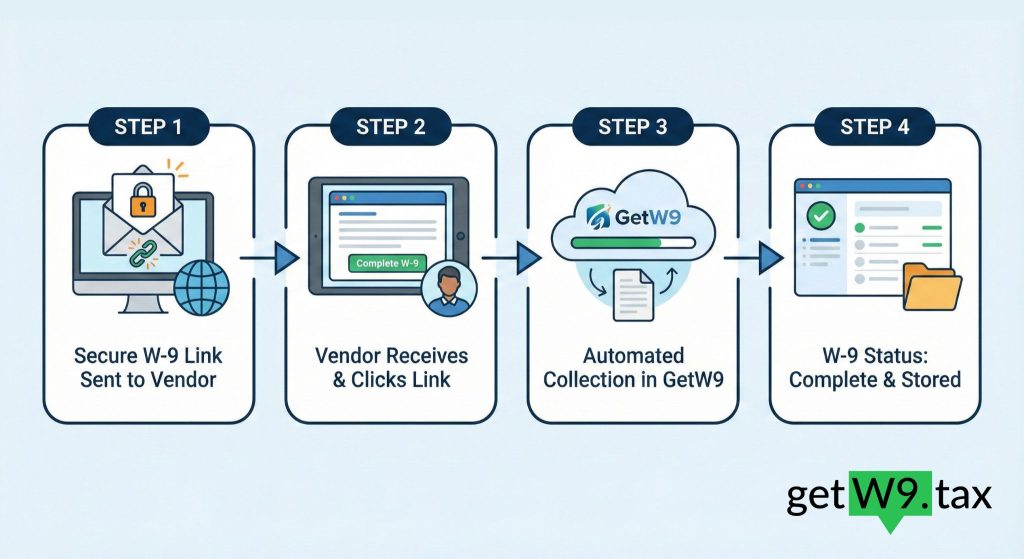
In an automated setup, the process looks more like this:
That is what people mean when they talk about “automate W-9 collection.”
It’s not magic or a huge IT project. Instead, it’s a cleaner way to handle a repetitive, important task.
To make this more concrete, let’s use GetW9 as an example of how automated W-9 collection works in real life. You could follow a similar pattern with any proper W-9 tool, but GetW9 is built specifically for this job.
First, you pull your vendor details into GetW9:
From that moment, you can see one list of everyone who still needs to give you a W-9.
Next, you:
Each person receives their own secure link. They no longer need to manage forms or attachments.
On the vendor side:
Because the form is online and mobile-friendly, there is no need to print, sign, scan, or search for extra tools.
Back in GetW9, you have a dashboard with:
This means you always know:
“We have W-9s for 43 out of 50 vendors. These 7 still need attention.”
Instead of hunting through emails and folders, you can see your status in seconds.
Finally, you can set up automatic reminder emails once. After that, the system follows up with vendors at the right time.
You only step in for special cases or more sensitive relationships. As a result, your inbox stays cleaner and your team stays focused on work that needs a human touch.
A better W-9 workflow is not just about saving your time. It also reduces friction for the people you pay.
With the old process, vendors:
By contrast, with an automated flow:
Because the job is simple, quick, and feels secure, vendors tend to respond faster. That improvement alone can cut weeks of back-and-forth.
You feel the weaknesses of your W-9 process most clearly in December and January.
At the start of the year, you are often juggling:
If you realise at that moment that:
you are stuck running an emergency W-9 campaign at the worst possible time. This often means late nights, weekend work, and a lot of stress.
When you automate W-9 collection, the pattern changes:
Instead of asking:
“How many W-9s are we missing?”
you can ask:
“Is there anyone left to tidy up before we send 1099s?”
That small shift has a big impact on how you feel during the busiest part of the year.
You do not need a huge project plan to get started. In fact, you can begin with a few small steps this week.
Start by pulling a list of:
Your current accounting system or spreadsheet is enough for this step.
Next, pick a tool designed to automate W-9 collection. Look for features like:
GetW9 was built around exactly these needs: automated W-9 collection, status tracking, and secure storage with a clear history of submissions.
To reduce risk, begin with a pilot group:
This simple test gives you real-world feedback without forcing a full change overnight.
After a few days, sign in and check:
From there, you can follow up only where it is truly needed, instead of guessing.
Once the process feels comfortable, make “Send W-9 invite via GetW9” a standard step when you:
Over time, W-9 collection stops feeling like a big yearly project. Instead, it becomes a small, regular part of how you work.
When teams move from manual W-9 collection to an automated workflow, they often notice several changes:
You still have to send 1099s and meet your obligations. However, you are no longer blocked by a messy, manual W-9 process.
Collecting W-9s will probably never be the most exciting part of your work. Even so, it doesn’t need to be the part that takes your evenings, fills your inbox, and turns every January into a small crisis.
By:
you can turn W-9 collection from a chase into a simple workflow.
If you’d like to see what that looks like in practice, you can try using GetW9 for your next round of W-9 requests. It is designed to sit quietly inside your workflow and take care of the heavy lifting:
Because you have better things to focus on than chasing one more W-9.
Try our past blogs:
What Is a W-9 Form? Why Businesses Need It in 2025 | GetW9
1099 vs W-9: What’s the Difference? | GetW9
CP2100/CP2100A & “B” Notices: Your 15-Day and 30-Day Action Plan