Physical Address
5206 Hwy 5 N Suite 100, Bryant, AR, United States, Arkansas
Physical Address
5206 Hwy 5 N Suite 100, Bryant, AR, United States, Arkansas


If you’re chasing W-9s in January, you’re not “bad at ops.” You’re just living the classic contractor problem: vendors get paid… forms get ignored… and suddenly you’re staring at a messy list and a deadline.
This guide gives you a simple rescue plan you can run in a day, plus email templates that actually get responses.
What you’ll walk away with:
You don’t need perfection today. You need control.
When you’re late on W-9 collection, these are the real risks:
The goal is simple: reduce uncertainty and create a repeatable system.
Vendors respond when they need something. If you don’t create urgency, the W-9 sits.
If your list is spread across inboxes, spreadsheets, Slack messages, and accounting tools, nobody owns it.
One email isn’t a process. A schedule is.
No submission history, no timestamps, no record of follow-ups = chaos.
Name/TIN mismatches and wrong classifications cause avoidable issues later.
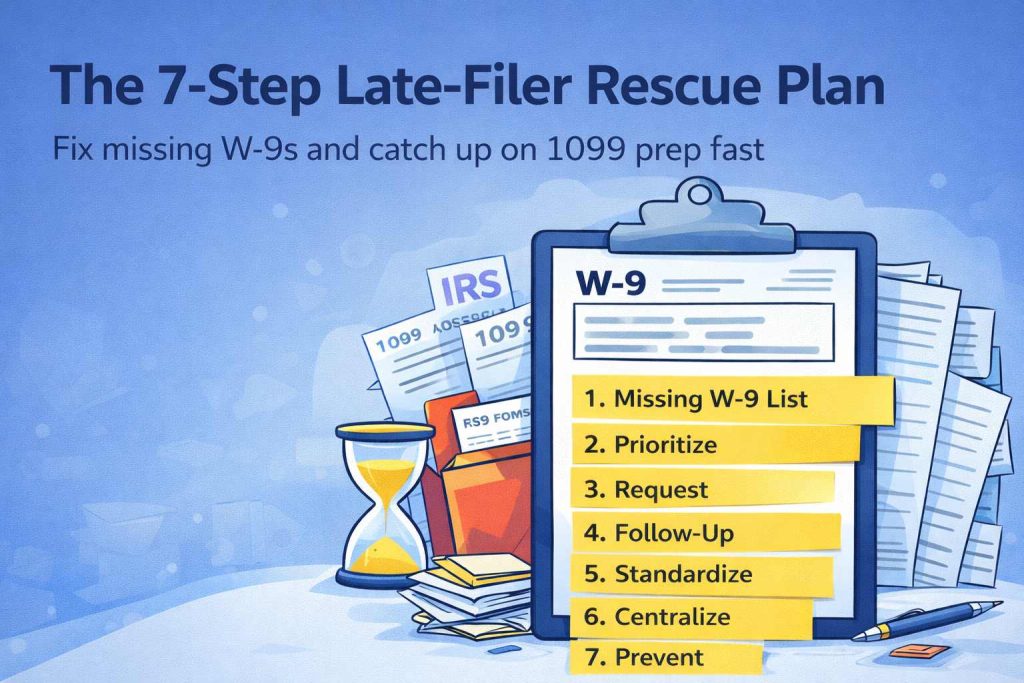
Below is the fastest path to go from “chasing forms” to “I know exactly where we stand.”
| Step | What you do | Time | Output |
|---|---|---|---|
| 1 | Build your missing W-9 list | 20 min | One clean list |
| 2 | Prioritize by payout and deadline risk | 10 min | Tier 1 / Tier 2 vendors |
| 3 | Send the right W-9 request | 20 min | Initial requests sent |
| 4 | Lock a follow-up cadence | 10 min | Day 2 / Day 5 / Day 10 schedule |
| 5 | Standardize vendor naming | 15 min | Fewer mismatches |
| 6 | Centralize PDFs + submission history | 20 min | Clean recordkeeping |
| 7 | Prevent this next year (simple rule) | 10 min | Process set |
Stop guessing. Create a single list with:
If you use multiple tools, pick one as the owner (even a spreadsheet for today). The key is: one list, one owner, one status column.
Split vendors into two tiers:
Tier 1 (do first):
Tier 2 (do next):
This prevents you from spending 3 hours chasing someone you paid once for $80.
The best request:
If you want a clean way to send one secure W-9 link, track submissions, and save completed W-9 PDFs with a submission history, use GetW9.
Here’s the simple cadence that works without annoying people:
Most teams fail because they follow up randomly. Vendors respond to predictable pressure.
This sounds boring, but it saves real time.
Rule: Use the vendor’s legal name as it appears on the W-9 as your primary vendor name.
If you’re paying individuals:
If your PDFs are scattered:
You want:
This is where automation actually helps—not because it’s “cool,” but because it eliminates dumb manual work.
No W-9 = no first payment.
Or if your business can’t do that, then:
No W-9 = payment goes out, but the vendor is auto-flagged for follow-up until complete.
Pick one. Don’t leave it ambiguous.
Subject: W-9 request for your vendor profile
Hi {{FirstName}},
Quick request — can you complete your W-9 for our records?
It takes about 2 minutes. Please use this link:
{{W9Link}}
Thanks,
{{YourName}}
{{Company}}
Subject: Friendly reminder — W-9 needed
Hi {{FirstName}},
Just a quick reminder to complete your W-9 when you get a moment:
{{W9Link}}
Thank you!
{{YourName}}
Subject: Action needed — W-9 required for our records
Hi {{FirstName}},
We still don’t have your W-9 on file. Please complete it here:
{{W9Link}}
If you’ve already submitted it, reply and I’ll confirm.
Thanks,
{{YourName}}
Keep your follow-up schedule, document the attempts, and avoid paying again until they complete it (if your process allows). Vendors respond when it affects payments.
The W-9 is the same form. What changes is how they fill it out (legal name, tax classification, etc.). Many individuals won’t have a separate business name line filled in.
If a vendor fails to provide correct taxpayer information, there are rules around backup withholding. If this applies to you, consult your tax professional for the correct handling based on your situation.
Store both. You want the completed W-9 PDF and a clear submission record so you can retrieve it quickly later.
If you’re tired of chasing forms every January, GetW9 is built for exactly this workflow: