Physical Address
5206 Hwy 5 N Suite 100, Bryant, AR, United States, Arkansas
Physical Address
5206 Hwy 5 N Suite 100, Bryant, AR, United States, Arkansas


The week between Christmas and New Year is quiet for most teams.
But for finance and ops? It’s the calm before the January storm.
If you pay contractors, vendors, freelancers, or service providers, you already know what’s coming: the 1099 rush. The deadline hits fast, and the most common reason teams panic isn’t “the filing.” It’s the messy reality underneath it:
So let’s make this practical. Here’s a straightforward plan to clean up your W-9s now so January doesn’t turn into a chase.
A W-9 isn’t “just a form.” It’s how you collect the vendor’s correct taxpayer info name and TIN—so you can file the right information return.
When that info is missing or inconsistent, you risk:
This is why the last week of December is your advantage: you can fix the foundation before everyone goes offline, travels, or disappears into Q1 chaos.
Pull a list of everyone you paid this year:
Goal: one master list.
Pro tip: Don’t overthink the “who needs a 1099” logic yet. First, get the list.
Add a simple status column:
If you do nothing else this week, do this. The visibility alone changes everything.
Vendors don’t ignore you because they “hate paperwork.” They ignore you because your process is annoying:
Your ask should be one clear sentence:
“Please complete your W-9 using this secure link so we can finalize your vendor records for 1099 season.”
(And yes, send it in one batch. Manual one-off requesting is how teams end up chasing for weeks.)
If you have to “remember” who didn’t respond, you already lost.
Set reminders now so the nudging happens while you work on real tasks.
Most W-9 problems aren’t missing forms, they’re incorrect info that gets discovered late:
Fixing these issues in December is cheap. Fixing them in late January is chaos.
If your W-9s live in:
…you will lose time later.
You want two things:
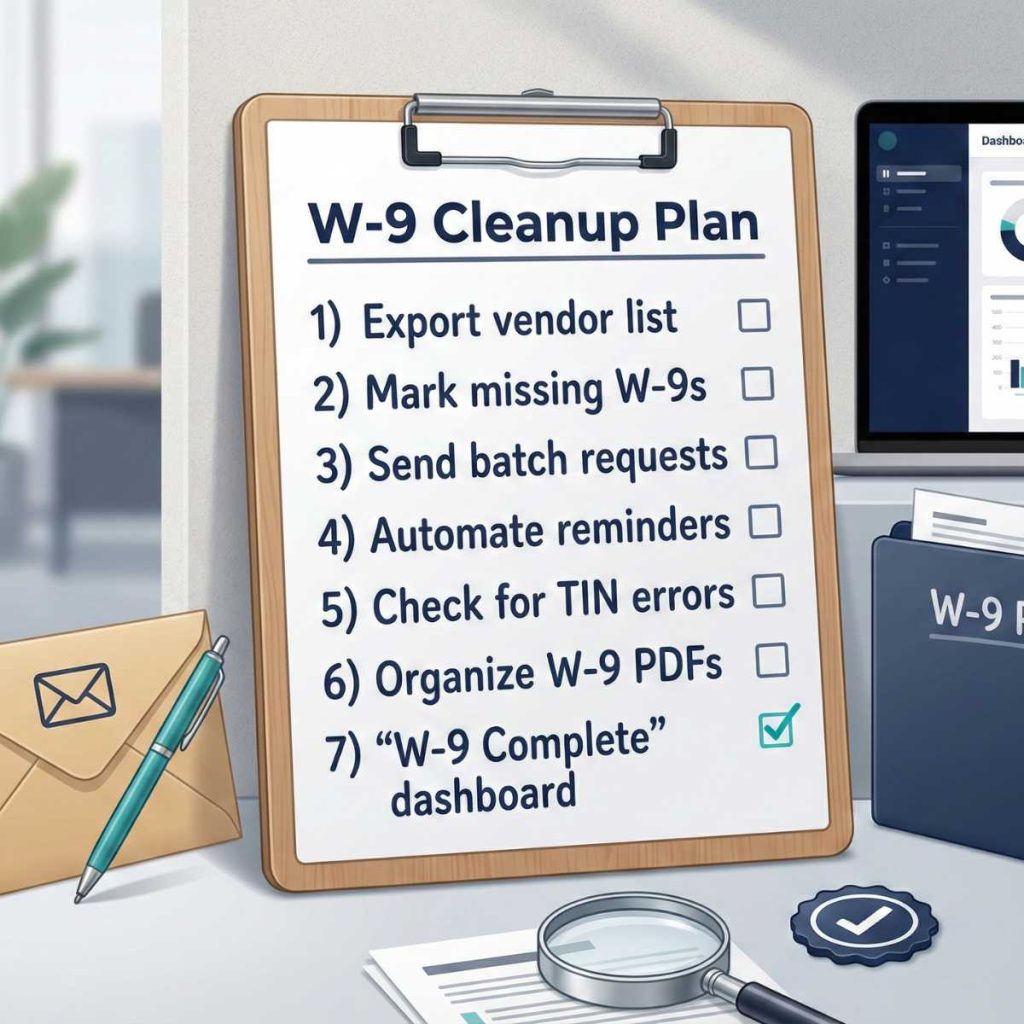
January should be a checklist, not a scavenger hunt.
Your “ready” state looks like:
If you file 10 or more total information returns (across types), the IRS requires e-filing. That reality is pushing more small businesses into “do it right the first time” processes because corrections get painful fast. irs.gov
GetW9 is built for exactly this:
If you use QuickBooks, connect it to auto-import vendors and keep your list clean.
Your goal for this week: stop chasing W-9s manually before the countdown gets loud.
Try GetW9 and get your W-9 list under control before January hits.